

what's changed
Change Logs
Keep up to date with recent changes and improvements. We regularly enhance and improve our plugin based on customer feedback.
V3.3
= 3.3 – 9th September 2026 =
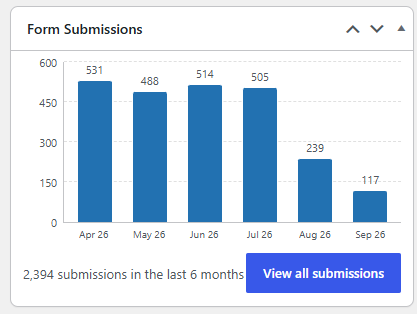
New Feature: Dashboard widget
- A “Form Submissions” widget now appears on the WordPress Dashboard (for users who can manage options)
- Shows a bar chart of submissions per month plus a running total, with a “View all submissions” button
- Configure how many months the chart covers (1–36, default 12) via the widget’s Configure link
New Feature: Monthly Summary screen
- New Submissions → Summary screen with a month-by-month table and a 12-month bar chart
- Filter the whole view by the page/form a submission came from
- Click any month to drill down to a per-page breakdown for that month, then jump straight to those submissions
Bug Fix: CSV export column order didn’t match the form
- Export columns now follow the field order used in the Divi form builder, including fields that only appear conditionally
- Previously, column order depended on which submission happened to be processed first, so conditional fields could end up scattered or pushed to the end of the export
V3.2.x
= 3.2.1- 10th June 2026 =

New Feature: Choose the confirmation email recipient field
- Forms that collect more than one email address no longer guess — previously the confirmation was always sent to the *last* email field found on the form
- New “Confirmation Recipient Field(s)” setting lets you name the exact Divi Field ID(s) the confirmation should go to (e.g. `email_1, email_2`)
- Available both globally (Settings → Email Notifications) and per-form (Per-Form Email Rules), where the rule overrides the global setting for that form
- Leaving it blank keeps the previous auto-pick behaviour
- List several field IDs to send to all of them; fields left blank on a submission are skipped — so an either/or form (e.g. Company vs. Private buyer) routes automatically to whichever email field the submitter filled in
Enhancement: Comma-separated BCC addresses
- The global and per-form “BCC Email” fields now accept multiple addresses separated by commas; invalid addresses are dropped
= 3.2 – 19th May 2026 =
New Feature: Weglot Multi-Language Compatibility
- Form submissions now record the actual language-specific URL (e.g. `mywebsite.com/fr/contact`) instead of always showing the canonical domain URL
- The active language is detected at submission time and stored with each entry (displays as “Language: FR” in the submission detail view)
- New “Source URL” row in the submission detail view shows a clickable link to the exact page the form was submitted from
- Detection uses Weglot’s own API when the Weglot plugin is active, with a URI prefix fallback for other subfolder setups
New Feature: Per-Language Confirmation Emails
- New “Per-Language Confirmation Emails (Weglot)” section in Settings
- Destination languages are auto-detected from your Weglot configuration — no manual setup required
- Set a separate confirmation email subject and body for each language (e.g. a French email for `/fr/` submissions)
- Priority order: language template → per-form rule → global settings; leaving a language template blank falls back gracefully
- New placeholders available in all confirmation email templates: `{source_url}` and `{language}`
V3.1.x for Divi 5
= Version 3.1- 31st March 2026 =
-
Per-Form Email Rules – Override the plugin’s global email settings for individual Divi contact forms.
- Bug fixes – Divi 4 sites triggered 2 emails due to Divi 4 and Divi 5 code running. Bulk Delete from View Submissions screen wasn’t deleting.
= Version 3.1.1- 13th May 2026 =
- <img> support in custom emails: You can now include images in your custom confirmation emails
- Bug fix: Exporting all combined forms incorrectly had export date not submission date in the CSV.
V3.0 for Divi 5
= Version 3.0 - 3rd Feb 2026 =

- Divi 5 Support – Tested with Divi 5 beta on 3rd Feb.
- CSV Export Improvements – Fixed column alignment for forms with conditional fields.
- Word Block List – Supports a simple list of blocked words. Prevents email notifications when a match is found.
V2.3
= Version 2.3 - 23rd Dec 2025 =
- Enable custom confirmation email – Enable this to replace the default English email with your custom content.
- Custom email subject – Localise the subject line to suit your site.
- Custom email body – Write your own confirmation email, include {Name}, {Email Address}, {site_name}, {page_name} or other form fields via place holders.
Allowed HTML tags: a, hr, em, strong, i, u, p, br.

V2.2 & V2.2.3 &V2.2.4
= Version 2.2 =

- Submission Summary – View submissions by year and month.
- Bulk Delete – Delete all submissions in one go, or select a custom date range.
- IP Address logging – Logs submitters IP address (viewable on the individual submission view).
= Version 2.2.3 =2nd Dec 2025 =
- View Submissions – Added filters for Submission page and read status
- Bug fix: Some submissions may cause duplicate entries if multiple forms were used on one page.
= Version 2.2.4 - 4th Dec 2025 =
- New Setting – Send Emails As: Enter the email address to use as the sender for all plugin emails (e.g., noreply@yourdomain.com). This should be an email address from your website’s domain. If left empty, the WordPress admin email will be used.

V2.1
= Version 2.1 includes 3 new emails =
- BCC form submission – Includes a copy of any forms to a second email address (ideal for testing, or clients that say they never saw an email).
- Thank you – Sends a copy of the form submission to the person who submitted it.
- Resend a submission – Sends a copy of a form submission to the site administrator.


